BYOC overview
Bring Your Own Cloud (BYOC) runs NebulaGraph databases on a data plane in your AWS account. You use NebulaGraph Cloud to deploy and manage the data plane and databases, and authorize AWS access through two IAM roles.
Architecture
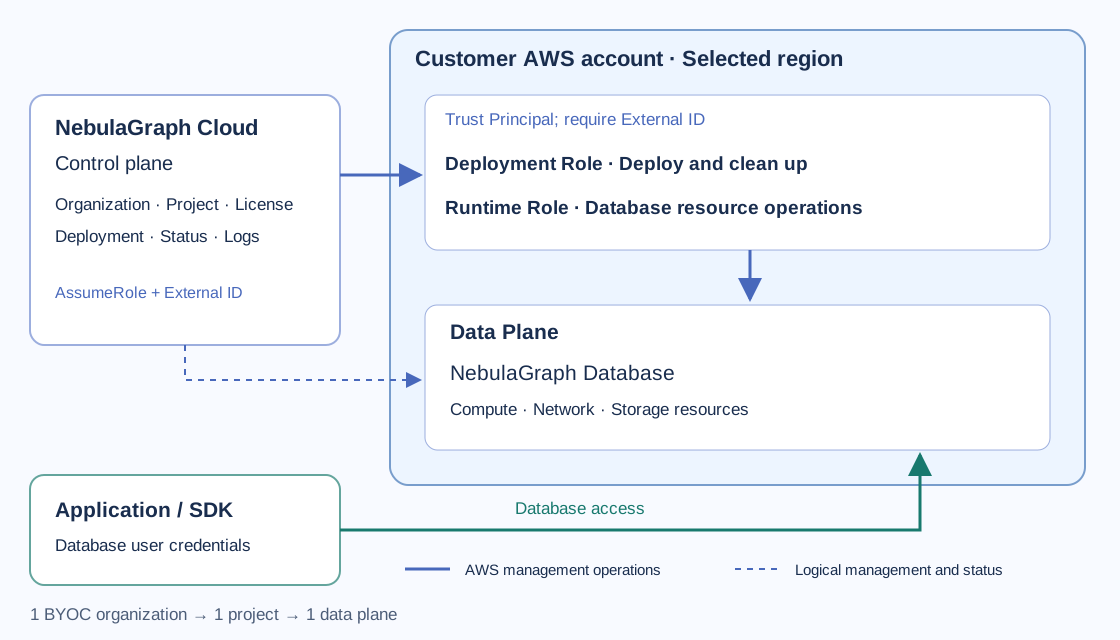
The control plane is the NebulaGraph Cloud management service: organizations, projects, deployment actions, and status. The data plane is the environment in your AWS account that hosts databases and their supporting compute, network, and storage resources. The diagram shows how NebulaGraph Cloud manages AWS resources and how applications access databases.
The Deployment Role authorizes infrastructure deployment and cleanup. The Runtime Role authorizes database-related AWS resource operations. Both trust the NebulaGraph Principal provided by the platform (shown as Principal in the UI) and require the data plane's External ID. Your applications use a database endpoint and database user credentials to access the database; they do not use these management roles as database credentials.
Resource model and limits
One BYOC organization supports one project and one data plane. The data plane hosts the project's databases, subject to available license quota. If a project or data plane already exists, use it instead of creating another.
Use a standard commercial AWS account, excluding AWS China and AWS GovCloud accounts. Select a supported region from Deploy Data Plane and use the IAM template to grant AWS access.
| Item | Fully managed | BYOC |
|---|---|---|
| Database infrastructure | Managed cloud environment | Your AWS account |
| Start | Create a database | Obtain a BYOC organization, then deploy a data plane |
| AWS authorization | No BYOC IAM setup | Customer creates Deployment and Runtime roles |
| Commercial model | Fully managed pricing and billing | License agreement plus customer AWS costs |
Prepare for BYOC
- Obtain a BYOC organization from your NebulaGraph Cloud contact. Its license is provided and configured with the organization; you do not upload or activate a license.
- Have an Organization Owner create the sole project, or use the existing project.
- Have an Organization Owner or Project Admin perform data plane and database operations.
- Prepare a customer AWS account and an AWS administrator who can review and create the required IAM authorization.
- Install Terraform and AWS CLI and prepare local AWS authentication as described in Deploy a data plane.
Deployment workflow
- Deploy a data plane: create its Pending record, run the IAM template locally, submit the two role ARNs, and wait for Running.
- Create a BYOC database: choose a tier and capacity that fit the license.
- Connect to the database: configure network access and database credentials.
- Use the shared guides for graph management, data import, queries, and exploration.
For ongoing administration, see Manage the data plane and databases, License and costs, and Security and permissions. If a step fails, see Troubleshooting.