Access control explained
BYOC authorization
BYOC also requires AWS IAM authorization, separate from Cloud account roles and database users. For operation roles and responsibilities, see BYOC security and permissions.
NebulaGraph Cloud employs Role-Based Access Control (RBAC) to manage resource access precisely. Based on RBAC, privileges are assigned to roles, and these roles are then assigned to users for efficient access control. This topic explains the RBAC architecture of NebulaGraph Cloud.
RBAC architecture
Here is a diagram to illustrate the RBAC architecture:
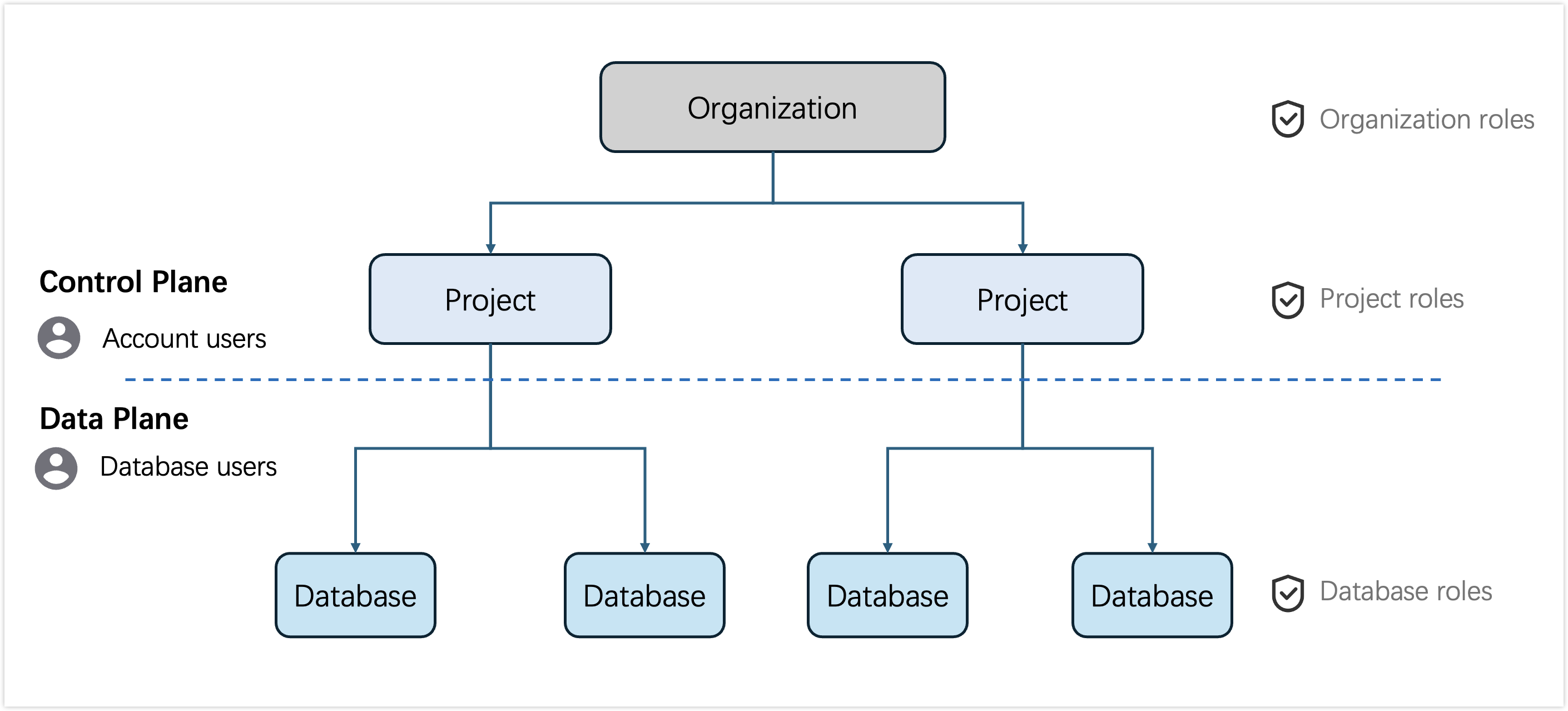
NebulaGraph Cloud organizes resources on two planes:
-
Control plane encompasses the management of the following resources:
Account users are granted specific organization roles and project roles for operations on the control plane. For more information, see Account user management.
-
Data plane focuses on database access management for NebulaGraph Database.
Database users are granted specific database roles to access NebulaGraph Database via SDKs. For more information, see Database user management.
User types
NebulaGraph Cloud provides two types of users:
- Account user: a user with a NebulaGraph Cloud account and performs operations in the web console of NebulaGraph Cloud.
- Database user: a user to access NebulaGraph Database. Typically, you only need to use database users when connecting to NebulaGraph Database via SDKs.
Roles and privileges
The role hierarchy in NebulaGraph Cloud is as follows:
On the control plane:
- Organization roles: determine the account user's access to specific organization resources and the operations they can perform, including
Organization OwnerorOrganization AdminandOrganization Member.
- Project roles: determine the account user's access to specific project resources and the operations they can perform, including
Project AdminandProject Member.
On the data plane:
- Database roles: determine the database user's access to specific database objects and actions that can be performed on these objects, including
ADMIN,SCHEMA_DESIGNER,GRAPH_READ_WRITEandGRAPH_READ_ONLY. Typically, you only need to manage database roles when connecting to NebulaGraph Database via SDKs.
Organization roles
NebulaGraph Cloud provides three organization roles:
- Organization Owner: A role that has full privileges of all resources in the organization, including organization management, project management, database management, billing, and organization access. There is only one user with this role in an organization.
- Organization Admin: A role to access an organization and manage the organization members with limited management privileges.
- Organization Member: A standard member role to access an organization without management privileges.
Here is the detailed privileges matrix for these roles:
| Category | Privilege in NebulaGraph Cloud | Organization Owner | Organization Admin | Organization Member |
|---|---|---|---|---|
| Organization Management | Create an organization | 🔒 | ❌ | ❌ |
| Delete an organization | 🔒 | ❌ | ❌ | |
| Rename an organization | ✅ | ✅ | ❌ | |
| View organization list | ✅ | ✅ | ✅ | |
| Leave an organization | ❌ | ✅ | ✅ | |
| Project Management | Create a project | ✅ | ❌ | ❌ |
| Delete a project | ✅ | ❌ | ❌ | |
| Rename a project | ✅ | ✅ | ❌ | |
| View project list | ✅ | ✅ | ✅ | |
| Leave a project | ❌ | ✅ | ✅ | |
| Organization Access | Invite organization members and grant roles | ✅ | ✅ | ❌ |
| Modify organization roles | ✅ | ✅ | ❌ | |
| Remove organization members | ✅ | ✅ | ❌ | |
| Transfer organization ownership | ✅ | ❌ | ❌ | |
| View organization members | ✅ | ✅ | ✅ | |
| Billing | Try NebulaGraph Cloud for free | ✅ | ❌ | ❌ |
| Upgrade to a paid plan | ✅ | ❌ | ❌ | |
| View usage details | ✅ | ❌ | ❌ | |
| Manage your subscription | ✅ | ❌ | ❌ |
- ✅: Full access
- ❌: No access
- 🔒: Controlled by the system
Project roles
NebulaGraph Cloud provides two project roles:
- Project Admin: A role to manage the project resources and project members.
- Project Member: A standard member role to use the database instances in the project.
Here is the detailed privileges matrix for these roles:
| Category | Privilege in NebulaGraph Cloud | Project Admin | Project Member |
|---|---|---|---|
| Project Access | Invite project members and grant roles | ✅ | ❌ |
| Modify project roles | ✅ | ❌ | |
| Remove project members | ✅ | ❌ | |
| View project members | ✅ | ✅ | |
| Database User Management | Create a database user | ✅ | ❌ |
| Modify database roles | ✅ | ❌ | |
| Reset password | ✅ | ❌ | |
| Delete a database user | ✅ | ❌ | |
| View database users | ✅ | ✅ | |
| Database Management | Create an instance | ✅ | ❌ |
| Suspend & resume an instance | ✅ | ❌ | |
| Scale an instance | ✅ | ❌ | |
| Delete an instance | ✅ | ❌ | |
| Operations on Console | Read permissions | ✅ | ✅ |
| Write permissions | ✅ | ❌ |
- ✅: Full access
- ❌: No access
For detailed operation permissions on NebulaGraph Cloud console, see Required role at the beginning of each section in the following topics:
Database roles
Here is the detailed privileges matrix for these roles:
| Database Role | Privileges in NebulaGraph Database |
|---|---|
ADMIN |
All privileges |
SCHEMA_DESIGNER |
CREATE GRAPH TYPE, ALTER ANY GRAPH TYPE, DROP ANY GRAPH TYPE, CREATE PROCEDURE, ALTER ANY PROCEDURE, DROP ANY PROCEDURE |
GRAPH_READ_WRITE |
CREATE GRAPH, ALTER ANY GRAPH, DROP ANY GRAPH, INSERT ANY GRAPH, DELETE ANY GRAPH, UPDATE ANY GRAPH, MATCH ANY GRAPH, CREATE INDEX, DROP ANY INDEX, REPAIR ANY INDEX, EXECUTE ANY PROCEDURE |
GRAPH_READ_ONLY |
MATCH ANY GRAPH, EXECUTE ANY PROCEDURE |
For more information about the database instance management, see Database management.